
Internet Conneted Lights (NodeRED & MQTT) 💡
In this workshop we will going learn build a Internet Conncted Lights with the help of NodeRED and MQTT.
Required Hardware 🛠
- NodeMCU ESP8266
- LED’s
- Switch
- Raspberry Pi (Not mandatory)
Required Softwares 👨💻
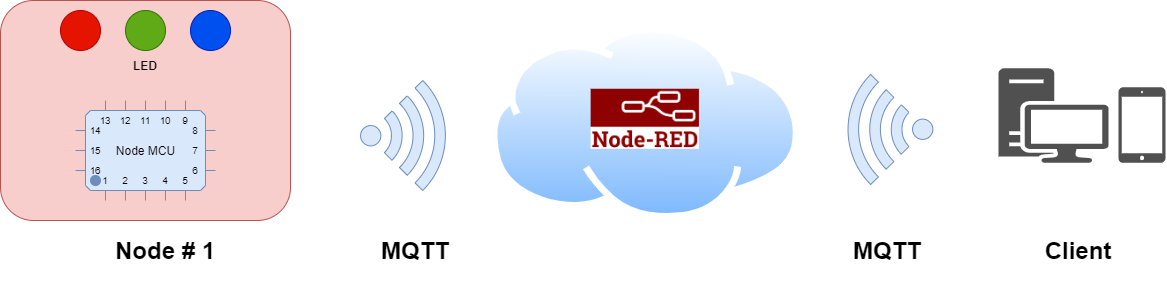
Architecture
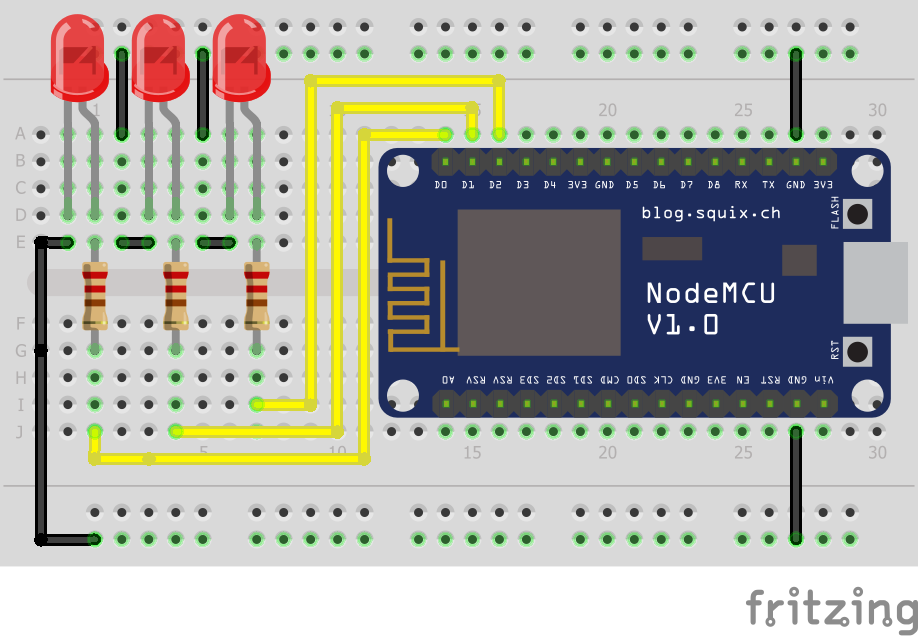
Step 1 : Connect NodeMCU and LED’s
Step 2: Install Arduino IDE and Add NodeMCU.
You can download and Install Arduino IDE from here Arduino IDE In default Arduino IDE only Support Native boards like UNO,Nano.. etc , so we need to install NodeMCU Board and MQTT Libraries .
NodeMCU Board Definition
Open Arduino IDE and add additional Board URL File => Preference (Ctrl + Comma)
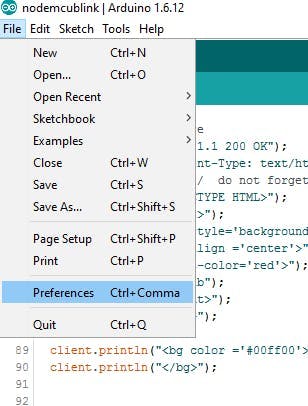
In Additional Boards Manager, click add and paste the URL there http://arduino.esp8266.com/stable/package_esp8266com_index.json And click “OK”.
Stuck somewhere?
Ask in the MakerGram Telegram group or post on the community forum. Share a photo of your wiring and the error message, and someone will help you out.